
Agent status
The five states an agent can be in, how kittymux decides each from the screen and hooks, why a quiet screen never means waiting, and how to ask why.
Every tab with an agent in it shows exactly one state. The tab bar, the deck, the docked panel and the ctrl+alt+y jump all show the same one, because they read one shared answer.
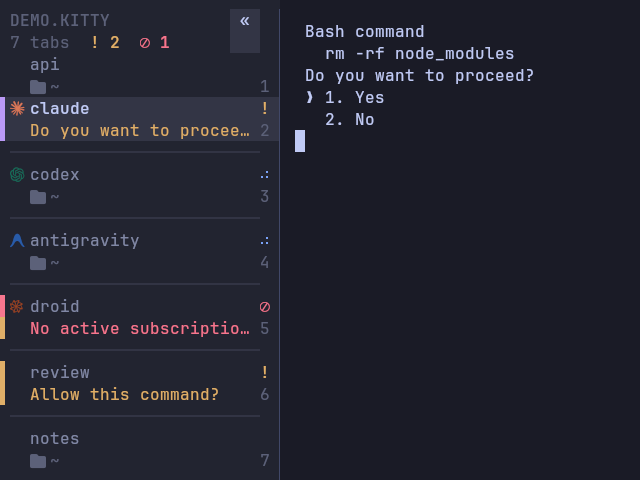
The states
| Glyph | State | Meaning |
|---|---|---|
⠋⠙⠹… (animated) | working | The agent is busy. The spinner runs at 10 frames a second, on any window. |
! | waiting | It is asking you something: a permission prompt or a question. The question is shown as the reason. |
⊘ | limited | A usage limit or quota is exhausted. Nothing will happen until you act. |
✓ | done | It finished while you were looking elsewhere. It clears the moment you focus it. |
| nothing | idle | An agent is running and not doing anything. |
• | unread | Output arrived in a tab that has no agent. |
When more than one applies, the order is limited, then waiting, then working, then done, then idle. A tab shows its panes rolled up: the most important state of all of them, not just the focused pane's. Jumping to a tab that needs you lands on the pane that is asking.
How it knows
Twice a second, and every two seconds when no agent is running, kittymux reads the bottom of each agent pane's screen. It looks for the markers real agents print, such as esc to interrupt, Do you want to proceed? and usage limit reached, and combines them with hook status when you have hooks.
A state needs positive evidence. Silence is never "waiting". A quiet title is not read as waiting. An agent you interrupted does not spin forever. A "waiting for your input" idle notice is not a request.
Claude, Codex, Devin, Gemini, Cursor, OpenCode, Amp, Antigravity and Factory droid work with no setup. Other agents with a logo, and aider and crush, use hooks or title activity. See Platforms and compatibility for which markers have been checked against live sessions.
When is something "done"?
A false "finished" is worse than none, so the rules are strict.
- The agent's own word wins. When a hook announced the turn, only the agent's
Stophook ends it. A quiet screen between tool calls, a repaint or anescinterrupt is not a completion. Agents without hooks are judged by the screen alone. - An answered permission request is not "done". It is why the agent paused.
- A limit ends when its reset time does. When the message names a time ("try again at 9:21 PM", "resets in 2h 30m"), the tab says when it lifts (
↻12m, "resets in 12m" in the panel) and stops being limited at that time, even while the old message is still on screen. A fresh message with a new time is a new limit. With no time in the message, the tab stays limited until the screen changes. - One limit, one notification. An agent that you retry prints the same limit message again, and the tab flips between working and limited. That is one episode: it is announced once, not once per retry.
- A busy line above an idle prompt is old output. Devin shows "Ask Devin to build features" only when it is idle. A line such as
Working (1s • esc to interrupt)printed above it, for example a pasted log, does not make the tab work. - Prose is not a prompt. Text like
(y/n)or "usage limit reached" inside the agent's own reply, above a live spinner, is ignored. A real dialog, which hasesc to cancelchrome, still wins. - A completion has to settle and be known. It counts only after the pane stays finished for five seconds, and it notifies only when kittymux saw it work for at least 15 seconds.
Hooks
Hooks add what the screen cannot say: the exact message an agent is waiting on, and instant transitions. They are optional and used alongside the screen.
kittymux hooks --install    # merges the Claude Code hooks into ~/.claude/settings.json, after a backup
kittymux hooks --remove     # takes exactly those entries back out; every other hook is untouched
kittymux hooks              # only prints the snippet
The Claude Code events are UserPromptSubmit and PostToolUse for working, Notification for waiting, Stop for done and SessionEnd for idle. kittymux doctor tells you when one is missing. To add them by hand:
{
  "hooks": {
    "UserPromptSubmit": [{ "hooks": [{ "type": "command", "command": "~/kittymux/bin/mux-status working" }] }],
    "PostToolUse":      [{ "hooks": [{ "type": "command", "command": "~/kittymux/bin/mux-status working" }] }],
    "Notification":     [{ "hooks": [{ "type": "command", "command": "~/kittymux/bin/mux-status waiting" }] }],
    "Stop":             [{ "hooks": [{ "type": "command", "command": "~/kittymux/bin/mux-status done" }] }],
    "SessionEnd":       [{ "hooks": [{ "type": "command", "command": "~/kittymux/bin/mux-status idle" }] }]
  }
}
mux-status takes working, waiting, done or idle. For another agent, call it from whatever hook or notify command that agent offers. It writes a window variable that kittymux reads, works over ssh without a socket, and never blocks or fails the agent. The waiting message comes from --msg, from the hook's JSON on standard input, or from a JSON last argument.
Inside tmux the escape needs passthrough. kittymux then falls back to kitty's remote control, which needs listen_on.
Ask why
When a state is not what you expected, ask:
kittymux explainkitty 4062
win 77 claude working Kitty lightweight tm the screen shows a busy marker
win 192 codex limited Audit codebase securit the screen shows a usage-limit message
recent decisions (oldest first):
23:58:31 win 77 claude idle → working the screen shows a busy marker
00:03:02 win 77 claude working → done its Stop hook fired
00:03:07 win 77 claude notify done sent (worked 271 s)
00:09:40 win 18 claude notify done suppressed: worked only 4 s (< 15 s)Every state change and every notification decision is recorded: sent, or the reason it was held back, such as you were looking at it, it is switched off, a rate limit, too short or an unknown duration. --window ID filters, --last N sets how many, --all covers every running kitty and --json is for scripts.
The log is a bounded in-memory list of 300 events plus a private file per kitty that rotates at 192 KB. It holds reason codes and window ids, never screen text.
Splits
A split tab shows a to-scale picture of its panes under its title, each pane tinted by its state: amber waiting, blue working, red limited, with the focused pane brighter. Each agent pane is also listed on its own, as indented child lines in the deck and panel (you can hover to preview that pane and click to focus it) and as small logo-and-state chips in the bar.
Peek, deck and panel
Look at a tab you are not in without switching to it: a right-click peek card, the sidebar deck and the always-visible docked panel.
Notifications and inbox
What reaches you and when: one desktop notification per event, a bell that never moves your focus, an inbox for everything, and switches to quiet it.