
The tab bar
Read what each tab row says, tell look-alike tabs apart with the folder line, switch between sidebar, rail and hidden modes, and resize the bar.
The bar replaces kitty's tab strip with a vertical list that reads like a workspace list. Every colour comes from your own theme, so it follows theme changes.
Read a row
Each tab has a title row and a folder line under it.
| Part | Meaning |
|---|---|
| Logo | The agent's brand mark, or a muted logo for a recognised tool such as bun, docker, rust or neovim. A plain shell stays blank. |
| Title | The tab's name, or its running program. |
| State glyph | A spinner while working, ! when it needs you, ⊘ at a usage limit, ✓ when it finished while you were away. Shape and colour both carry the meaning. |
| Time | How long it has been waiting or working, such as 1m !. |
⚠ | The agent was started with its approvals turned off. |
| Layout picture | For a split tab, a to-scale picture of its panes, each tinted by its state. |
The header shows ! 2 ✓ 1: how many agents need you and how many finished unseen, across every tab of the window. See Agent status.
Tell tabs apart: the folder line
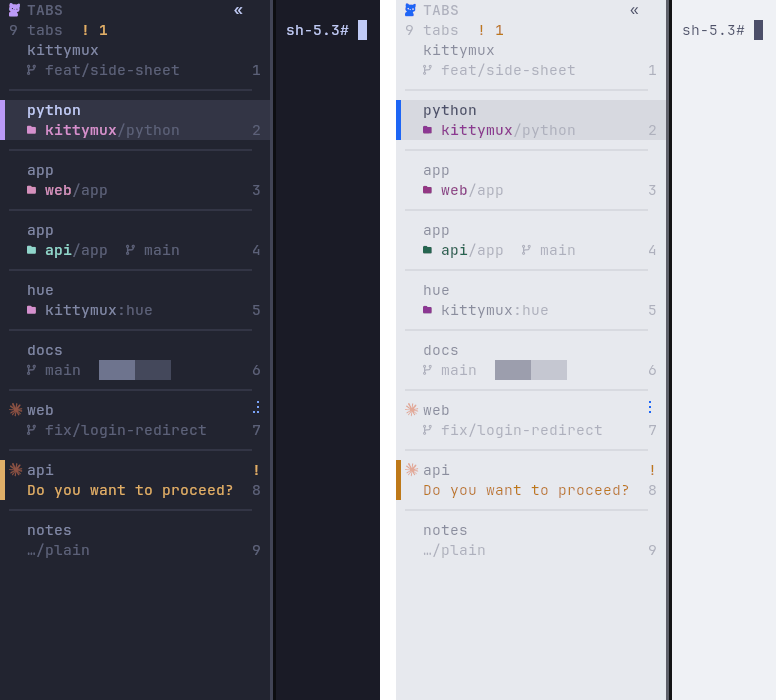
Under each tab the bar says where it is: project[:worktree]/inner branch. With many tabs open this is the line that keeps them apart, even when the title says nothing.
- The project name is the one bright thing on the line. On the active tab it takes the project's own colour. The path and branch step down.
- That colour is a calm tint turned from your theme's accent and kept clear of the state colours, so a project never looks like a state. The name is always written; the colour is never the only cue.
- Two tabs that show the same title get their project emphasised, so
appandappare easy to separate. - A tab whose title already names the project, such as a shell titled by its folder or an agent titled
Claude:web, shows its branch, path or worktree instead of repeating the name. - In a narrow bar the branch goes first, then the path. A long name is cut in the middle (
kit…ux:hue), never dropped. - The slim rail has no room for a line, so it tints the tab number with the project's colour.
The same line appears in each pane's title bar when you press ctrl+alt+shift+c. See Tabs and panes.
Choose which pieces you want
Every optional piece has its own switch. Use all of it, some of it or none.
| Switch | What it does when on | Default |
|---|---|---|
folder | The project and branch line under each tab. Off shows just the branch, as before. | On |
hue | A stable colour per project, derived from your theme's accent. | On |
collide | Emphasises the project of tabs that show the same title. | On |
panetitle | The same line, then the pane's own title, in each pane's title bar. | On |
motion | The working spinner turns. Off shows one still frame and stops the redraw timer. | On |
titles | A tab is called by its task, or by its project when the title is only a product name or an agent's reply; long titles are cut at a word. | On |
sudo | A notification when sudo, doas, su or pkexec waits for your password in a pane you are not looking at. | On |
loginprompt | The same for ssh and git asking for a passphrase, a password or to trust a host. | On |
pkgprompt | The same for pacman, paru, yay, apt and dnf waiting for a yes or a no. | On |
socketlink | A link at /tmp/mykitty-<pid> to kitty's real control socket, so scripts that look there still find kitty. | On |
sheet | A side sheet. Planned: the switch is saved but nothing reads it yet. | Planned |
hover | Open the sheet on hover. Planned. | Planned |
kittymux features                  # what is on, and where each setting comes from
kittymux features off hue          # turn one piece off
kittymux features preset minimal   # the folder line only (presets: minimal, default, full)
KITTYMUX_HUE=off kitty             # per process, by environment; the environment wins
A switch is a flag file in ~/.local/state/kittymux. The environment variable, such as KITTYMUX_HUE, wins over the file.
Modes, edges and presets
The layout belongs to one kitty instance and takes effect at once. A new kitty starts the way you last left one, or with your own kitty.conf if you never chose.
| To | Keys |
|---|---|
| Cycle full sidebar, slim rail, hidden | ctrl+alt+\ |
| Collapse or expand with the mouse | Click « in the header to collapse. Click » to expand. |
| Move the bar: left, bottom, top, right | ctrl+alt+shift+e |
| Pick a preset | ctrl+alt+shift+l: sidebar, rail, right-sidebar, bottom, top, zen |
| Narrower or wider | ctrl+alt+shift+[ and ctrl+alt+shift+], or drag the edge |
The same from a shell:
kittymux layout mode cycle          # full, compact, hidden
kittymux layout edge top
kittymux layout width 30
kittymux layout preset rail
kittymux layout show
kittymux layout default             # start new windows like this one; "default clear" goes back to following your last choice
The rail is nine columns wide and shows each tab's logo, number and state mark, plus the !2 ⊘1 badges. The collapse button acts when you release the mouse, like a button, and never activates a tab.
Resize with the mouse
Drag the bar's inner edge and release. The pointer is captured, so it keeps working outside the bar. The width is saved for that kitty.
- It is never narrower than 16 columns. A drag from the rail promotes it to the full sidebar.
- It is never wider than a third of the window, or 60 columns.
- A drag that goes silent for 2.5 seconds is abandoned, so the mouse can never stay captured.
The pointer over the divider
On kitty 0.49.2 and later the divider is drawn by kitty's own border renderer and the drag is kitty's own divider drag. Two things follow from how kitty works:
- In a tab with two or more panes, the pointer over the divider is kitty's native resize arrow.
- In a tab with one pane, kitty does not hit-test borders, so there is no arrow. The bar's last two columns are the grab zone instead, and over the bar kitty always shows a hand.
This is kitty's behaviour and kittymux cannot change it. See The pointer is a hand over the bar edge.
Colours
kittymux hardcodes no palette. Every colour is derived from your live kitty theme: pane, sidebar tint, active row, separator and the state colours (from the ANSI colours, checked for contrast). Set KITTYMUX_ACCENT=#rrggbb to pin the accent. The default is your theme's active_border_color.
The folder line remains visible when a question or limit appears. Its message gets a separate row when the configured height permits; the state glyph always remains on the title. A split tab keeps its pane count at narrow widths. The tiny layout picture is shown only when its sampling includes every visible pane; use Peek for the numbered diagram and full details.
Tabs and panes
Move panes and tabs around: join a tab into another as splits, turn a pane into a tab, swap panes, jump by number and drag title bars.
Peek, deck and panel
Look at a tab you are not in without switching to it: a right-click peek card, the sidebar deck and the always-visible docked panel.